CapVoxa
Face-to-face translation on one shared screen
Set your iPhone between two people. CapVoxa rotates the far half of its split screen so each person can read their own language.
Get CapVoxa on the App Store ↗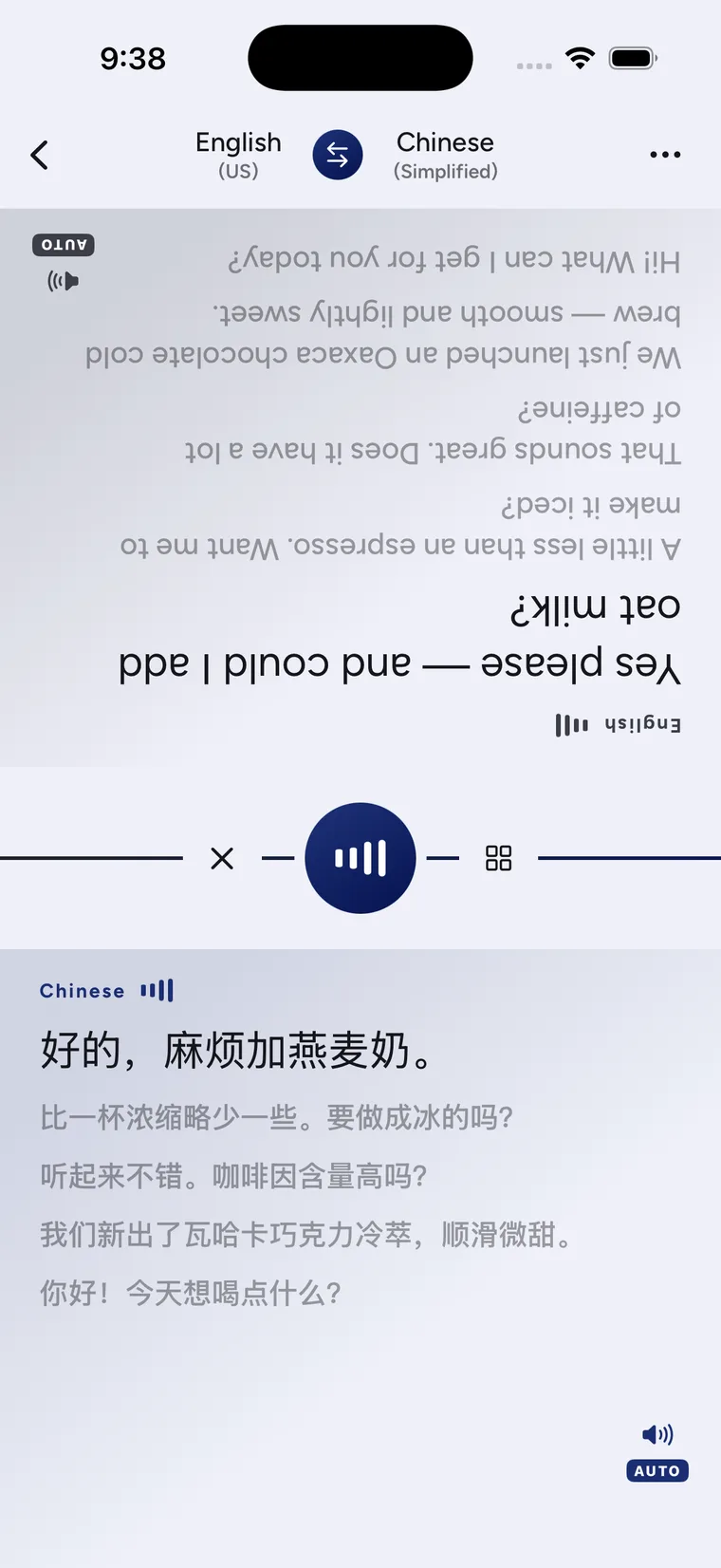
A shared screen that faces both people
Face-to-face mode divides the phone screen in two and rotates the far half. Lay the iPhone between you so each person can read in their own direction, without repeatedly picking it up and turning it around.
It is useful at a hotel desk, across a table or when sitting down to clarify details. Sharing the screen gives both people a chance to spot a problem in the recognized original or translated text.
Use the split screen
- Select both languages in Conversation, then check internet access and microphone permission.
- Switch to the face-to-face layout and put the phone where both people can read it.
- Each person should try a short sentence. Check that the language and reading direction are correct on your half.
- Take turns. Slow down, shorten a sentence or point to a key word on screen when helpful.
- Repeat times, prices and places for confirmation. Ask the other person to type important numbers separately if needed.
Choose spoken playback when it suits the surroundings. When playing sound would be disruptive, reading the shared text can still help.
A layout does not replace checking
Rotating the text does not improve speech recognition by itself. Background noise, network conditions and speaking style still affect translation. If several people speak around a table at once, a single phone may not capture them clearly. Take turns and seek qualified help where needed.
A fluent translation can still be wrong. Before signing, paying or making another important decision, confirm the relevant terms and numbers independently.
Common questions
Do we need two phones?
No. The face-to-face layout provides two reading directions on one iPhone.
Can I return to the regular conversation layout?
Yes. Face-to-face is one of the conversation layouts. Start with the conversation tutorial, then choose shared reading, ordinary conversation or earbud translation for the situation.
Sources and product guidance
Get CapVoxa on the App Store
Internet required. Free allowances and subscription benefits follow the app.
Get CapVoxa on the App Store ↗